|
|
@@ -1,276 +1,474 @@
|
|
|
|
# Kutu WM
|
|
|
|
# A Window Management System
|
|
|
|
|
|
|
|
|
|
|
|
## What is a window manager?
|
|
|
|
*Daanish Syed*
|
|
|
|
|
|
|
|
|
|
|
|
A graphical desktop is made of many separate programs (a browser, a terminal, a file manager) all sharing one screen. Each application only knows how to draw its own contents inside a rectangle called a window. They have no idea where that window should sit on the screen, how big it should be, or what should happen when several windows overlap. This is the job of a window manager (WM).
|
|
|
|
> AQA Extended Project Qualification Level 3.
|
|
|
|
|
|
|
|
|
|
|
|
A window manager is the software that controls the placement and appearance of windows on a graphical display.
|
|
|
|
November 2026
|
|
|
|
|
|
|
|
|
|
|
|
The things a window manager is usually responsible for are:
|
|
|
|
---
|
|
|
|
- Placement and sizing: deciding where a new window appears and how large it is, and handling the user moving or resizing it.
|
|
|
|
|
|
|
|
- Focus and stacking: tracking which window currently receives input and which windows are in front of others.
|
|
|
|
|
|
|
|
- Workspaces: grouping windows onto virtual desktops that can be switched between. (This is not always implmented but I personally like the concept.)
|
|
|
|
|
|
|
|
- Input handling: reacting to global keyboard shortcuts and mouse actions that don't belong to any one application.
|
|
|
|
|
|
|
|
- Minimized state: WM's also handle minimized windows with sometimes a taskbar which shows these windows. (I do not plan on making this work.)
|
|
|
|
|
|
|
|
|
|
|
|
|
|
|
|
Window managers are generally split into a few categories based on how they arrange windows. Stacking (floating) window managers let windows overlap freely, like papers on a desk, which is what Windows and macOS do. Tiling window managers automatically arrange windows so that they never overlap and fill the screen, usually controlled almost entirely from the keyboard. Dynamic window managers can switch between these approaches.
|
|
|
|
# Table of contents
|
|
|
|
|
|
|
|
|
|
|
|
A window manager is not the same thing as a desktop environment (DE).
|
|
|
|
1. Nomenclature
|
|
|
|
A desktop environment such as KDE or GNOME bundles a window manager together with panels, settings tools, file managers and more.
|
|
|
|
2. Analysis
|
|
|
|
A basic window manager does only the window management and leaves the rest to the user, which is what makes it a good scope for a project like this one.
|
|
|
|
- Project Motivation
|
|
|
|
|
|
|
|
- Problem Definition
|
|
|
|
|
|
|
|
- Aims and Objectives
|
|
|
|
|
|
|
|
3. Background Research
|
|
|
|
|
|
|
|
|
|
|
|
On X11 specifically, the window manager is just another client program that talks to the X server. It is not built into the display system. It asks the server to redirect window requests to it, so that when an application asks to show or resize a window, the WM gets to decide what actually happens. This is exactly why X11 allows replacing the window manager entirely, and why I can build my own.
|
|
|
|
---
|
|
|
|
|
|
|
|
|
|
|
|
^ Wikipedia (2026). Window manager. [online] Available at: https://en.wikipedia.org/wiki/Window_manager [Accessed 7 October 2026].
|
|
|
|
# Nomenclature
|
|
|
|
|
|
|
|
|
|
|
|
## X11
|
|
|
|
1. Window Manager: A program responsible for controlling the placement, appearance and behaviour of application windows within a graphical user interface.
|
|
|
|
|
|
|
|
|
|
|
|
On Windows the window management is handled by the **Desktop Window Manager (DWM)** by Microsoft. Since window management is directly integrated into the operating system, it is not designed to be replaced by users with a completely custom window manager. (although extentions can be made, they are not as complete.)
|
|
|
|
2. Paradigms: General approaches or styles used when designing and structuring software. Examples include procedural, object-oriented and functional programming.
|
|
|
|
|
|
|
|
|
|
|
|
MacOS's also have a similar situation where they build and roll out the WM along with the core operating system itself.
|
|
|
|
3. Graphical Stack: The collection of software components responsible for displaying and managing a graphical user interface, including display servers, window managers, compositors and graphical libraries.
|
|
|
|
|
|
|
|
|
|
|
|
If I want to build my own window manager, Linux provides a much more suitable environment. Linux is highly customisable, and the graphical session on linux devices can be chosen by the user, as such they can start thier own programs as the graphical session directly from the tty or through their init system (like `systemd`).
|
|
|
|
4. Desktop Environment: A collection of software that provides a complete graphical desktop experience. This commonly includes a window manager, file manager, panel, application launcher and system settings.
|
|
|
|
|
|
|
|
|
|
|
|
The two main display server protocols to consider are:
|
|
|
|
5. Scripting: A script is a relatively short and simple set of instructions that typically automates an otherwise manual process. The act of writing a script is called scripting. A scripting language, or script language, is a programming language used for scripting.
|
|
|
|
|
|
|
|
> https://en.wikipedia.org/wiki/Scripting_language
|
|
|
|
|
|
|
|
|
|
|
|
|
|
|
|
6. Embedded Scripting Language: A programming language designed to be integrated into another program (the host). It allows scripts to be interpreted at runtime, enabling users to customise or extend the host program's functionality without modifying or recompiling its source code. The host program can also expose its own functions and features for scripts to use.
|
|
|
|
|
|
|
|
|
|
|
|
|
|
|
|
7. C-ABI (C Application Binary Interface): An application binary interface (ABI) is an interface exposed by software that is defined for in-process machine code access. Often, the exposing software is a library, and the consumer is a program. The C ABI is the most commonly used ABI format across major operating systems and languages.
|
|
|
|
|
|
|
|
> https://en.wikipedia.org/wiki/Application_binary_interface#C
|
|
|
|
|
|
|
|
|
|
|
|
|
|
|
|
8. FFI (Foreign Function Interface): A mechanism that allows a program written in one programming language to call functions or access functionality written in another language. It is commonly used to connect a high-level language to libraries written for C.
|
|
|
|
|
|
|
|
|
|
|
|
|
|
|
|
9. C-Shims
|
|
|
|
|
|
|
|
|
|
|
|
|
|
|
|
10. VM
|
|
|
|
|
|
|
|
|
|
|
|
|
|
|
|
---
|
|
|
|
|
|
|
|
|
|
|
|
|
|
|
|
# Analysis
|
|
|
|
|
|
|
|
|
|
|
|
|
|
|
|
## Project Motivation
|
|
|
|
|
|
|
|
|
|
|
|
|
|
|
|
I have been trying to implement every useful bit of an operating system myself to understand how everything works deeply, and a major part of that graphical stack is the window management system.
|
|
|
|
|
|
|
|
I have been using tiling window management systems on my personal computer and have grown to really love the keyboard-driven interaction.
|
|
|
|
|
|
|
|
I feel like a window management system is arguably the most common thing most people interface with on their devices, and yet they never think about it.
|
|
|
|
|
|
|
|
So implementing it myself would be a good way for me to both understand how window management systems work and explore different programming paradigms and architectures.
|
|
|
|
|
|
|
|
|
|
|
|
|
|
|
|
## Problem Definition
|
|
|
|
|
|
|
|
|
|
|
|
|
|
|
|
#### The general problem
|
|
|
|
|
|
|
|
|
|
|
|
|
|
|
|
A graphical environment needs to allow multiple applications to run at once, all on the same display area (the screen). Each application window generally only knows what is to be drawn inside its own area, but higher-level interactions like resizing them, hiding or restoring the windows, their stacking order etc. need to be managed by a common program. This is necesary for most general purpose operating systems, as users expect to be able to move resize and manage the applications they use. [source]
|
|
|
|
|
|
|
|
|
|
|
|
|
|
|
|
This creates the need for a window manager (WM): software responsible for managing the dimensions and behaviour of application windows on a graphical display.
|
|
|
|
|
|
|
|
|
|
|
|
|
|
|
|
A window manager typically handles several responsibilities: [source?](https://pcpartsgeek.com/window-manager/)
|
|
|
|
|
|
|
|
- Placement and sizing: Where new windows are created, their size, and allowing the user to move or resize them.
|
|
|
|
|
|
|
|
- Focus and stacking: Deciding which window receives keyboard input and controlling the order in which windows appear when they overlap.
|
|
|
|
|
|
|
|
- Workspaces: Allowing windows to be organised into separate virtual desktops that users can switch between.
|
|
|
|
|
|
|
|
- Input handling: Responding to global keyboard shortcuts and mouse actions used to control window management.
|
|
|
|
|
|
|
|
|
|
|
|
|
|
|
|
These responsibilities form the basis of the software I intend to develop as part of this project.
|
|
|
|
|
|
|
|
|
|
|
|
|
|
|
|
#### Constraints
|
|
|
|
|
|
|
|
|
|
|
|
|
|
|
|
To keep the project manageable and define a clear scope, I will place several constraints on the window manager's functionality.
|
|
|
|
|
|
|
|
|
|
|
|
|
|
|
|
- I will be developing only a window manager rather than a complete desktop environment. This means I will not develop additional desktop components such as a taskbar, application launcher, file manager and similar software. [See nomenclature for definition of a DE]
|
|
|
|
|
|
|
|
- No decorations: I do not plan on drawing any decorations or border for the windows.
|
|
|
|
|
|
|
|
- Tiling window management: Windows will automatically be arranged to fill the available screen space rather than being freely positioned or overlapping one another.
|
|
|
|
|
|
|
|
- Configuration: The software will provide a mechanism for users to configure its behaviour, but I will not be developing a graphical settings application.
|
|
|
|
|
|
|
|
|
|
|
|
|
|
|
|
## Aims and Objectives
|
|
|
|
|
|
|
|
|
|
|
|
|
|
|
|
#### Aim
|
|
|
|
|
|
|
|
|
|
|
|
|
|
|
|
The aim is to design and implement a functional, keyboard-driven tiling window manager for Linux. The WM should provide reliable window arrangement, keyboard-based navigation through configurable shortcuts, with enough functionality to support everyday desktop use.
|
|
|
|
|
|
|
|
|
|
|
|
|
|
|
|
#### Objectives
|
|
|
|
|
|
|
|
|
|
|
|
|
|
|
|
1. Research into existing Window Management systems.
|
|
|
|
|
|
|
|
2. Investigate suitable programming languages and libraries.
|
|
|
|
|
|
|
|
3. Design an abstract representation for the window information to be stored internally and updated.
|
|
|
|
|
|
|
|
4. Implement automatic tiling and layout algorithms.
|
|
|
|
|
|
|
|
5. Implement window lifecycle and input handling.
|
|
|
|
|
|
|
|
6. Allow customising shortcuts and window actions.
|
|
|
|
|
|
|
|
7. Test and evaluate the system as a whole.
|
|
|
|
|
|
|
|
|
|
|
|
|
|
|
|
---
|
|
|
|
|
|
|
|
|
|
|
|
|
|
|
|
# Background Research
|
|
|
|
|
|
|
|
|
|
|
|
|
|
|
|
## Window Management Systems
|
|
|
|
|
|
|
|
|
|
|
|
|
|
|
|
### Operating System choice
|
|
|
|
|
|
|
|
|
|
|
|
|
|
|
|
Microsoft Windows and macOS account for most desktop operating systems used worldwide [source], but this project does not target either. This decision is due to the differences in their graphical architectures and the degree of control they provide to applications for managing other windows.
|
|
|
|
|
|
|
|
|
|
|
|
|
|
|
|
On Microsoft Windows, desktop composition and the presentation of application windows are handled by the Desktop Window Manager (DWM) [source]. DWM is an integrated component of the Windows graphical environment, responsible for compositing individual application surfaces into the final desktop image. Although Windows provides APIs that allow applications to manipulate window positions and dimensions [source], it does not provide a way to replace the system's existing window manager, making it not possible to build one from the ground up.
|
|
|
|
|
|
|
|
|
|
|
|
|
|
|
|
macOS also integrates window management into its graphical stack through components such as WindowServer [source]. Although applications can provide alternative window arrangement behaviours, it is not as simple as it is in Linux.
|
|
|
|
|
|
|
|
|
|
|
|
|
|
|
|
So if I want to build my own window manager, Linux provides a much more suitable environment. Linux is highly customisable, and the user can choose the graphical session on their Linux device; as such, they can start their own programs as the graphical session directly from the TTY or through their init system (like `systemd`) without restrictions.
|
|
|
|
|
|
|
|
|
|
|
|
|
|
|
|
The two main display server protocols to consider for Linux are:
|
|
|
|
|
|
|
|
|
|
|
|
* [Wayland](https://wayland.freedesktop.org/)
|
|
|
|
* [Wayland](https://wayland.freedesktop.org/)
|
|
|
|
* [X11](https://www.x.org/wiki/)
|
|
|
|
* [X11](https://www.x.org/wiki/)
|
|
|
|
|
|
|
|
|
|
|
|
### X11 vs Wayland
|
|
|
|
### X11 vs Wayland
|
|
|
|
|
|
|
|
|
|
|
|
Wayland (created in 2012) is a much newer Display Standard as compared to X11 which has been around since 1984.
|
|
|
|
Wayland (started in 2008) is a much newer display standard compared to X11, which has been around since 1984.
|
|
|
|
|
|
|
|
Although X11 has received many updates, the core philosophy remains the same.
|
|
|
|
|
|
|
|
|
|
|
|
Although X11 has recived many updates the core philosophy remains the same.
|
|
|
|
Wayland has been steadily replacing X11 across Linux distributions recently.
|
|
|
|
|
|
|
|
|
|
|
|
Wayland has been steadily replacing X11 across Linux distrobutions recently.
|
|
|
|
Data from [Linux Hardware](https://linux-hardware.org/?view=os_display_server) shows Wayland's adoption increasing significantly, although this shift is relatively recent.
|
|
|
|
|
|
|
|
|
|
|
|
Data from [Linux Hardware](https://linux-hardware.org/?view=os_display_server) shows Wayland's adoption increasing significantly, although this shift has happened relatively recently.
|
|
|
|
KDE's own metrics are also very useful. [David Edmundson's analysis of the KDE metrics](https://blog.davidedmundson.co.uk/blog/metrics-in-kde-are-they-useful/) showed an overall split of approximately **45% Wayland and 55% X11** at the time of this analysis. However, the distribution was quite different on systems where Wayland was the default: these systems showed closer to **80% Wayland and 20% X11**. This suggests that much of X11's remaining usage comes from existing installations rather than from users actively choosing it over Wayland, as most people go with whatever default is used.
|
|
|
|
|
|
|
|
|
|
|
|
KDE's own metrics also provide an interesting picture. [David Edmundson's analysis](https://blog.davidedmundson.co.uk/blog/metrics-in-kde-are-they-useful/) showed an overall split of approximately **45% Wayland and 55% X11** at the time of the analysis. However, the distribution was quite different on newer systems, where Wayland was the default: these systems showed closer to **80% Wayland and 20% X11**. This suggests that much of X11's remaining usage comes existing installations rather than from users actively choosing it over Wayland.
|
|
|
|
Several technical reasons explain this shift. X11 has grown significantly more complex over time, while Wayland was designed to address many of its issues. Wayland provides stronger security boundaries, reduces unnecessary frame-buffer copying and memory usage, and has a more straightforward approach to compositing and preventing issues such as screen tearing.
|
|
|
|
|
|
|
|
[comparison of X11 and Wayland](https://www.linuxteck.com/x11-vs-wayland/) and [Phoronix's discussion of the current X11/XWayland situation](https://www.phoronix.com/review/x_wayland_situation).
|
|
|
|
|
|
|
|
|
|
|
|
There are several technical reasons for this switching. X11 has gained a lot of architectural complexity over its lifetime, while Wayland was designed to address many of these limitations specifically. Wayland provides stronger security boundaries, reduces unnecessary frame-buffer copying and memory usage, and has a more straightforward approach to compositing and preventing issues such as screen tearing. These differences are discussed further in [this comparison of X11 and Wayland](https://www.linuxteck.com/x11-vs-wayland/) and in [Phoronix's discussion of the current X11/XWayland situation](https://www.phoronix.com/review/x_wayland_situation).
|
|
|
|
An important difference between X11 and Wayland is the responsibility assigned to the window manager and display server.
|
|
|
|
|
|
|
|
|
|
|
|
Despite these advantages, X11 still has some important benefits for this project. It is a mature and extensively tested system, and its architecture and tooling are well documented. For a project where I want to focus on implementing the window manager itself rather than dealing with the underlying display protocol, this maturity makes X11 considerably more approachable.
|
|
|
|
Under X11, the display server and window manager are separate components. The X server provides the underlying infrastructure for managing display resources, processing drawing requests and dispatching input events. The window manager operates as a separate X11 client, communicating with the server through an established protocol to control window placement, focus, etc. [source].
|
|
|
|
|
|
|
|
|
|
|
|
One particularly important feature for my workflow is X11's support for remote graphical applications over **SSH through X11 forwarding**. I regularly use SSH to work with remote servers, and this provides a straightforward way of running graphical applications remotely. Wayland does not provide an equivalent native mechanism with the same workflow, meaning additional technologies would be required.
|
|
|
|
Wayland adopts a different architecture in which the compositor also acts as the display server. Rather than relying on a separate, interchangeable window manager, the compositor manages application surfaces, handles input, and draws the final output on its own. Meaning the server itself manages the responsibility of the window manager (and vice versa). [source]
|
|
|
|
|
|
|
|
|
|
|
|
### Decision
|
|
|
|
This difference between the two protocols has significant implications for the scope of this project. Because in a Wayland compositor the same program must implement Window management, application buffer handling, compositing, any effects and the final draw to the hardware. While in X11, the window manager is separate from the server, meaning it only has to implement the window management system, and the Xorg server handles compositing and hardware management.
|
|
|
|
|
|
|
|
|
|
|
|
Although Wayland is the direction in which the Linux desktop ecosystem is moving, X11 is currently a better fit for the goals of this project.
|
|
|
|
Although libraries like wlroots can be used to simplify this for a Wayland implementation, it still adds unnecessary complexity beyond the original scope for this project.
|
|
|
|
|
|
|
|
|
|
|
|
Wayland offers a more modern architecture, particularly for security, compositing, and rendering. However, X11 provides a mature and well-established environment with simpler tooling for implementing a custom window manager, while also supporting a remote workflow that I already rely on.
|
|
|
|
So I chose X11 as the display protocol for this project because it separates display-server functionality from window management, allowing me to focus on developing window management algorithms, data structures, and user interaction rather than implementing an entire display server and compositor.
|
|
|
|
|
|
|
|
|
|
|
|
For these reasons, I have decided to implement my window manager as an **X11 window manager**.
|
|
|
|
One particularly important feature for my own workflow is X11's native support for remote graphical applications over **SSH through X11 forwarding** [source]. I regularly use SSH to work with remote servers, and this provides a straightforward way of running graphical applications remotely. Wayland does not provide an equivalent native mechanism with the same workflow [source], meaning additional applications [source] would be required to work remotely.
|
|
|
|
|
|
|
|
|
|
|
|
## Why use this WM specifically
|
|
|
|
### Existing systems.
|
|
|
|
|
|
|
|
|
|
|
|
Given various window management systems already exist for X11 why would i try to build my own? and specifically why anyone else might want to use it.
|
|
|
|
#### i3
|
|
|
|
|
|
|
|
|
|
|
|
My main focus for this project is going to be on runtime customizablity of the window manager, basically the user will have the full control on how their workflow works.
|
|
|
|
i3 is a popular, lightweight, keyboard-driven tiling window manager for X11, written in C.
|
|
|
|
|
|
|
|
|
|
|
|
It will be programmable at runtime where they can change the behaviour and add keybind based triggers too.
|
|
|
|
Its primary focus is tiling, where windows are arranged to occupy all the available screen space.
|
|
|
|
|
|
|
|
|
|
|
|
This will need to be done by a runtime embedded scripting system.
|
|
|
|
It achieves this by using a tree-based container system to represent window arrangements. Containers can be split horizontally or vertically, allowing users to get complex layouts while filling the entire screen.
|
|
|
|
|
|
|
|
|
|
|
|
## i3
|
|
|
|
It also does Window Decorations, that show a window's name and focus.
|
|
|
|
|
|
|
|
|
|
|
|
i3 arranges windows in a tree of containers, which the user splits horizontally or vertically as they open windows. This gives a lot of control over layout, and it is one of the most widely used tiling window managers, with a large community and plenty of documentation.
|
|
|
|
i3 can be configured through a static plain-text configuration file. Apart from settings like locales, startup apps etc. they can define shortcuts for particular keys in this config file. These shortcuts can perform actions such as navigating between windows, changing their sizes, switching workspaces or launching external commands.
|
|
|
|
|
|
|
|
|
|
|
|
The main difference is in how it is customised. i3 is configured through a plain text file with a fixed set of commands and directives. The user can bind keys to those commands and to external programs, but the behaviour of the WM itself cannot be programmed. Changing the configuration also means editing the file and reloading, rather than changing behaviour while it runs. i3 does provide an IPC interface over a socket that external programs can use to send it commands and query its state, but this means writing a separate program that sits outside the WM and talks to it, rather than writing logic inside it.
|
|
|
|
i3 also supports multiple workspaces, allowing windows to be organised into separate virtual desktops (that can also be defined in the configuration file).
|
|
|
|
|
|
|
|
|
|
|
|
The WM I plan on building uses a scripting language to run the code live and allows the user to design their workflow to do anything cool they can think of in a live runtime.
|
|
|
|
The main features I identified from i3 that could be relevant to this project are:
|
|
|
|
|
|
|
|
- Window Decorations
|
|
|
|
|
|
|
|
- Automatic window tiling.
|
|
|
|
|
|
|
|
- Horizontal and vertical window splitting.
|
|
|
|
|
|
|
|
- Keyboard-driven window navigation and focus management.
|
|
|
|
|
|
|
|
- Adjustable window sizes.
|
|
|
|
|
|
|
|
- Multiple workspaces.
|
|
|
|
|
|
|
|
- Configurable keyboard shortcuts.
|
|
|
|
|
|
|
|
- Execution of external commands through shortcuts.
|
|
|
|
|
|
|
|
- Multi-monitor support.
|
|
|
|
|
|
|
|
- Floating windows.
|
|
|
|
|
|
|
|
- IPC interface for remote control.
|
|
|
|
|
|
|
|
|
|
|
|
^ i3 (2026). i3 User's Guide. [online] i3wm.org. Available at: https://i3wm.org/docs/userguide.html [Accessed 7 October 2026].
|
|
|
|
^ i3 (2026). i3 User's Guide. [online] i3wm.org. Available at: https://i3wm.org/docs/userguide.html [Accessed 7 October 2026].
|
|
|
|
|
|
|
|
|
|
|
|
## Target users
|
|
|
|
#### Xmonad
|
|
|
|
|
|
|
|
|
|
|
|
The window manager is aimed at advanced Linux users who want to control their workflow through code rather than a fixed configuration file.
|
|
|
|
Xmonad is a tiling window manager for X11, written in Haskell.
|
|
|
|
|
|
|
|
|
|
|
|
### Stakeholder 1: Keyboard-driven tiling WM users
|
|
|
|
From my research, it has similar core functionality to i3.
|
|
|
|
|
|
|
|
But its approach to internal representation of the windows and configuration is quite different.
|
|
|
|
|
|
|
|
|
|
|
|
Users of window managers such as `i3`, `bspwm` or `dwm` who are comfortable in a terminal, edit their configuration by hand and control most of their desktop from the keyboard.
|
|
|
|
Where i3 uses a tree-based container system to represent window arrangements, Xmonad uses a composable layout system.
|
|
|
|
|
|
|
|
Meaning the core Window manager itself uses a subsystem to decide how the windows are placed, which by default is similar to i3, but the user can replace it with their own layout systems unlike i3.
|
|
|
|
|
|
|
|
|
|
|
|
These users already bind keys to launch programs and move windows, but they are limited to the commands the WM provides. With this window manager they could write their own behaviour, such as a keybind that cycles through windows of the same application, or a rule that automatically moves new terminal windows to a particular workspace.
|
|
|
|
This is possible because unlike the plain text configuration system i3 uses, Xmonad is configured in haskell.
|
|
|
|
|
|
|
|
This means configuration isn't limited to changing predefined settings: users can write code to define custom layouts, window management behaviour, keyboard shortcuts, and other functionality.
|
|
|
|
|
|
|
|
|
|
|
|
### Stakeholder 2: Developers and sysadmins who work remotely
|
|
|
|
The ability to use a general-purpose programming language for configuration is an interesting concept that I may consider incorporating into my own implementation, as it could provide a powerful way to customise the window manager's behaviour.
|
|
|
|
|
|
|
|
|
|
|
|
Users who regularly connect to remote servers over SSH and sometimes run graphical applications on them through X11 forwarding. I am part of this group, so I can also act as a source of requirements here.
|
|
|
|
## Feature list.
|
|
|
|
|
|
|
|
|
|
|
|
They would run the window manager locally and expect forwarded applications to behave like any other window: placed, tiled, focused and moved between workspaces. They could also script context-specific layouts, for example a keybind that opens a terminal and an editor side by side for a particular project.
|
|
|
|
Potential features I could add to my project.
|
|
|
|
|
|
|
|
|
|
|
|
X11 compatibility (which is why I chose X11 over Wayland), workspaces to separate projects or machines, reliable focus handling and fast response to input.
|
|
|
|
| | Feature | Priority |
|
|
|
|
|
|
|
|
| --- | --- | --- |
|
|
|
|
|
|
|
|
| 1 | Automatic window tiling. | Must |
|
|
|
|
|
|
|
|
| 2 | Horizontal and vertical window splitting. | Must |
|
|
|
|
|
|
|
|
| 3 | Keyboard-driven window navigation and focus management. | Must |
|
|
|
|
|
|
|
|
| 4 | Configurable keyboard shortcuts. | Must |
|
|
|
|
|
|
|
|
| 5 | Execution of external commands through shortcuts. | Must
|
|
|
|
|
|
|
|
| 6 | Adjustable window sizes. | Want |
|
|
|
|
|
|
|
|
| 7 | Multiple workspaces. | Want |
|
|
|
|
|
|
|
|
| 8 | Floating windows. | Want |
|
|
|
|
|
|
|
|
| 9 | Scriptable configuration. | Want |
|
|
|
|
|
|
|
|
| 10 | IPC interface for remote control. | Could |
|
|
|
|
|
|
|
|
| 11 | Multi-monitor support. | Won't |
|
|
|
|
|
|
|
|
| 12 | Window decorations. | Won't |
|
|
|
|
|
|
|
|
|
|
|
|
Stability matters most to this group. If the window manager crashes, they lose their whole graphical session, including any forwarded applications. A mistake in a script should be reported clearly without taking the session down.
|
|
|
|
---
|
|
|
|
|
|
|
|
|
|
|
|
Since the project is aimed at advanced users, I am not providing a graphical settings tool, panels or a taskbar, and I do not plan to support minimised windows. These are the responsibilities of a desktop environment rather than a basic window manager, and the stakeholders above are comfortable working without them.
|
|
|
|
# Technologies
|
|
|
|
|
|
|
|
|
|
|
|
They can script these features in using my api and other libraries if they want however.
|
|
|
|
## XCB vs Xlib
|
|
|
|
|
|
|
|
|
|
|
|
## Success criteria
|
|
|
|
Xlib and XCB are two C libraries that provide an interface for applications to communicate with an Xorg server. Both implement the X11 client-side protocol, allowing applications to perform operations like creating windows, modifying their properties, handling input events and controlling their position. Using such a library is very useful as directly attempting to communicate with the Xorg server is out of the scope of this project.
|
|
|
|
|
|
|
|
> https://www.x.org/guide/xlib-and-xcb/
|
|
|
|
|
|
|
|
|
|
|
|
|No.|Stakeholder need|Feature|Success criterion|
|
|
|
|
XCB is newer than Xlib, and it offers more fine-grained control over each operation, as it tries to map its working closer to the actual protocol used. This makes operations in XCB more verbose than in Xlib. But it is also in some ways better, it uses a more heavily asynchronous model as compared to Xlib giving some performance gains.
|
|
|
|
|---:|---|---|---|
|
|
|
|
|
|
|
|
|1|Change behaviour without restarting the session|Runtime mruby scripting|Editing a script and reloading it changes the WM's behaviour without restarting the WM or the X session|
|
|
|
|
|
|
|
|
|2|Fast keyboard-driven control|Scriptable global keybinds|A script can bind a key combination to an action, and it triggers every time with no noticeable delay|
|
|
|
|
|
|
|
|
|3|Automate behaviour when windows appear|Window event handling|A script can run code when a new window is created and change its position or workspace|
|
|
|
|
|
|
|
|
|4|Organise tasks and projects|Workspaces|The user can switch workspaces and move windows between them using keybinds|
|
|
|
|
|
|
|
|
|5|Predictable layout|Tiling and placement|New windows are placed automatically, do not overlap and fill the screen|
|
|
|
|
|
|
|
|
|6|Control over which window receives input|Focus and stacking|The focused window receives keyboard input and the user can change focus using the keyboard and mouse|
|
|
|
|
|
|
|
|
|7|Remote graphical workflow|X11 compatibility|An application forwarded over SSH is managed in the same way as a local window|
|
|
|
|
|
|
|
|
|8|Trust that the session is safe|Error handling|A script containing an error is caught and reported without crashing the WM|
|
|
|
|
|
|
|
|
|9|Responsive desktop|Performance|Opening, moving and switching windows feels immediate|
|
|
|
|
|
|
|
|
|10|Approachable scripting|Scripting interface|A new user can write a working keybind in a few lines of Ruby using the documentation provided|
|
|
|
|
|
|
|
|
|
|
|
|
|
|
|
|
## Language choice
|
|
|
|
I decided to use XCB to communicate with and control the X server as I found it easier to use.
|
|
|
|
|
|
|
|
|
|
|
|
This project involves two language decisions.
|
|
|
|
## Language
|
|
|
|
The first is the scripting language, the one users write their configuration and behaviour in.
|
|
|
|
|
|
|
|
The second is the host language, the one the window manager itself is written in.
|
|
|
|
|
|
|
|
|
|
|
|
|
|
|
|
### Embedded Scripting
|
|
|
|
To choose a language for the project, I first made prototypes in a few languages.
|
|
|
|
|
|
|
|
|
|
|
|
Embedded scripting languages are programming lanaguges that are designed to be embedded in a host programming language. The embedded language is often an interpreted language while the host is a compiled static typed language. They allow adding code to the program that can be modified and interpreted at runtime. They are often used to extend on the functionality of the host language. And they also allow using functions defined in the host language which are usually much more performance optimized.
|
|
|
|
### Ruby
|
|
|
|
|
|
|
|
|
|
|
|
They are usually very lightweight (so that the final binary doesn't get bloated and runs fast enough). They are very useful for cuztom DSL/syntax.
|
|
|
|
My first prototype used standard Ruby, calling XCB through Ruby's FFI bindings. I used a C shim file which I compiled with simpler functions for the operations I actually use. Then I wrote FFI bindings to bind these symbols to the Ruby code. I started with this because I already knew the language well, and it let me learn the X11 protocol (connections, event loops, window handling, key grabs, etc.) in a familiar environment.
|
|
|
|
|
|
|
|
|
|
|
|
We can also see a list [list](https://dbohdan.github.io/embedded-scripting-languages/) of embedded scripting languages that exist, common ones being Lua, javascript variants, squirrel, and ruby variants (mruby in particular).
|
|
|
|
This worked great as a learning tool. I got a basic window manager running in a couple of days, and it confirmed my understanding of the X11 event model.
|
|
|
|
|
|
|
|
|
|
|
|
These all have a C-ABI, meaning they can be used by almost any compiled language.
|
|
|
|
But I abandoned it for two reasons.
|
|
|
|
|
|
|
|
1. The first was performance. Ruby is not built for performance, it is built for ease of use. [source]
|
|
|
|
|
|
|
|
2. The second was structure. The prototype had grown into a collection of scripts rather than a single program as I wanted. It also meant users would need a Ruby interpreter and the FFI gem installed, which makes it harder to distribute and test on new systems.
|
|
|
|
|
|
|
|
|
|
|
|
|
|
|
|
Ruby is the right tool for prototyping but not for a finished product.
|
|
|
|
|
|
|
|
|
|
|
|
|
|
|
|
### Haskell
|
|
|
|
|
|
|
|
|
|
|
|
|
|
|
|
For the second version, I wanted a compiled, to make distribution easier. I chose Haskell because a tiling window manager is largely a state-transformation problem. And the layout tree is far more fun to implement in a functional language with pattern matching. Haskell's algebraic data types, pattern matching and emphasis on pure functions suit this well. (Even `Xmonad` is written in Haskell, which supports this reasoning.)
|
|
|
|
|
|
|
|
|
|
|
|
|
|
|
|
The state model was noticeably cleaner than in Ruby where everything was stored in hashmaps, and the project looked much better written.
|
|
|
|
|
|
|
|
|
|
|
|
|
|
|
|
But I stopped because of the toolchain. A full GHC installation took around 9 GB of disk space, it took 3.7 seconds for every build on my device, and I found the surrounding tooling (Stack and Cabal) difficult to work with. This slowed down the edit, build and test loop, which matters when most of the work is trial and error against a live X server.
|
|
|
|
|
|
|
|
|
|
|
|
|
|
|
|
Haskell showed me that this functional language style was perfect for this problem, but the toolchain did not suit my workflow.
|
|
|
|
|
|
|
|
|
|
|
|
|
|
|
|
### Final choice: OCaml
|
|
|
|
|
|
|
|
|
|
|
|
|
|
|
|
I moved to OCaml because it kept what worked in Haskell and removed what didn't.
|
|
|
|
|
|
|
|
|
|
|
|
|
|
|
|
It kept a very similar code style, so much of my Haskell design carried over directly.
|
|
|
|
|
|
|
|
|
|
|
|
|
|
|
|
It also has similar pattern matching and data types definition and usage meaning it was far easier to make this switch.
|
|
|
|
|
|
|
|
|
|
|
|
|
|
|
|
And the compiler and tooling are far lighter (395MB for my ocaml installation and 463ms to build a similar project on the same hardware), and `dune` handles building and dependency management with far less friction than my experience with Stack. OCaml also compiles to native code, giving a single binary and solving the distribution problem that Ruby had. And it also has an interpreted mode, making quick testing easy too.
|
|
|
|
|
|
|
|
|
|
|
|
|
|
|
|
However, OCaml has a smaller ecosystem, and no maintained XCB binding library suited my needs.
|
|
|
|
|
|
|
|
So I wrote the bindings myself using `ctypes`, with a few small C shims where the C API was awkward to call directly.
|
|
|
|
|
|
|
|
This was more work than using an existing library directly.
|
|
|
|
|
|
|
|
|
|
|
|
|
|
|
|
## Embedded Scripting
|
|
|
|
|
|
|
|
|
|
|
|
|
|
|
|
As I plan to make the window manager configurable at runtime using a script, I need an embedded scripting system to read the configuration and evaluate it in the correct context.
|
|
|
|
|
|
|
|
|
|
|
|
|
|
|
|
We can also see a relatively comprehensive [list](https://dbohdan.github.io/embedded-scripting-languages/) of embedded scripting languages; common ones include Lua, JavaScript variants, Squirrel, and Ruby variants (mruby in particular).
|
|
|
|
|
|
|
|
|
|
|
|
|
|
|
|
This list includes languages with a C-ABI, meaning they can be used by most programming languages with FFI.
|
|
|
|
|
|
|
|
|
|
|
|
^ Rordrigues, C. (2023). Embedded Scripting Languages. [online] caiorss.github.io. Available at: https://caiorss.github.io/C-Cpp-Notes/embedded_scripting_languages.html [Accessed 13 May 2026].
|
|
|
|
^ Rordrigues, C. (2023). Embedded Scripting Languages. [online] caiorss.github.io. Available at: https://caiorss.github.io/C-Cpp-Notes/embedded_scripting_languages.html [Accessed 13 May 2026].
|
|
|
|
^ Github. (2022). Embedded scripting languages. [online] Available at: https://dbohdan.github.io/embedded-scripting-languages/ [Accessed 13 May 2026].
|
|
|
|
^ dbohdan. (2022). Embedded scripting languages. [online] Available at: https://dbohdan.github.io/embedded-scripting-languages/ [Accessed 13 May 2026].
|
|
|
|
|
|
|
|
|
|
|
|
#### What options do i have.
|
|
|
|
#### Why Mruby
|
|
|
|
|
|
|
|
|
|
|
|
(https://caiorss.github.io/C-Cpp-Notes/embedded_scripting_languages.html, and mention commonality of lua etc.)
|
|
|
|
Why Ruby is great for development for the runtime of this WM:
|
|
|
|
|
|
|
|
|
|
|
|
#### Why use Mruby
|
|
|
|
- Dynamic typing. It has almost no type declarations for variables, and duck typing means any object with particular behaviour can be treated the same way.
|
|
|
|
|
|
|
|
- Expressive syntax. Ruby has one of the most expressive syntaxes, which greatly improves code readability; it allows operator overloading, very clean DSL structures, minimal punctuation, and many syntactic shortcuts.
|
|
|
|
|
|
|
|
- Very rich standard library. The Ruby stdlib has many helpers for JSON, sockets, networking, file management, multithreading, regex, etc.
|
|
|
|
|
|
|
|
- It also has a lot of built-in data types with helper methods that allow doing a lot of stuff. It has integers with no hard maximum, floating-point numbers, strings, and arrays, but it also has symbols, hashmaps, and regex, etc., for much faster development.
|
|
|
|
|
|
|
|
|
|
|
|
Why ruby is great for development for the runtime of this WM:
|
|
|
|
And as its official website states, Ruby is easy to write and easy to read, with natural syntax like spoken language.
|
|
|
|
|
|
|
|
|
|
|
|
- Dynamic typing. it has almost no type declarations on variables, and duck typing means any object with particular behaviour can be treated the same.
|
|
|
|
|
|
|
|
- Expressive syntax. ruby has one of the most expressive syntax that improves code readability by a lot, it allows operator overloading, very clean dsl structures, minimal puntuation neccessary, and a lot of syntactic shortcuts.
|
|
|
|
|
|
|
|
- Very rich standard library. the ruby std lib has a lot of helpers for json, sockets, networking, file management, multithreading, regex etc.
|
|
|
|
|
|
|
|
- It also has a lot of inbuilt datatypes with helper methods that allow doing a lot of stuff. it has integers with no hard maximum, floating point numbers, strings and arrays, but it also has symbols, hashmaps and regex etc. for much faster development.
|
|
|
|
|
|
|
|
|
|
|
|
|
|
|
|
And as its official website itself states, ruby is easy to write, easy to read with natural syntax like spoken language.
|
|
|
|
|
|
|
|
|
|
|
|
|
|
|
|
> Ruby's expressive syntax allows you to write complex logic concisely. By leveraging powerful features like metaprogramming and blocks, you can reduce repetition and focus on solving core problems. With rich testing frameworks, you can maintain quality while achieving rapid development cycles.
|
|
|
|
> Ruby's expressive syntax allows you to write complex logic concisely. By leveraging powerful features like metaprogramming and blocks, you can reduce repetition and focus on solving core problems. With rich testing frameworks, you can maintain quality while achieving rapid development cycles.
|
|
|
|
|
|
|
|
|
|
|
|
> Ruby has a simple and intuitive syntax that reads like natural language. By eliminating complex symbols and verbose constructs, Ruby's design philosophy allows you to express what you want directly. With minimal boilerplate and high readability, it's friendly to beginners and maintainable for experienced developers.
|
|
|
|
> Ruby has a simple and intuitive syntax that reads like natural language. By eliminating complex symbols and verbose constructs, Ruby's design philosophy allows you to express what you want directly. With minimal boilerplate and high readability, it's beginner-friendly and maintainable for experienced developers.
|
|
|
|
|
|
|
|
|
|
|
|
For these reasons and my personal familiarity with the languge i've planned to use ruby as the languge in which the WM code is written.
|
|
|
|
(these are citations)
|
|
|
|
More specifically we will use the `mruby` version as it allows for embedding a lightweight ruby VM into our WM that can run the scripts without needing an external interpreter.
|
|
|
|
|
|
|
|
|
|
|
|
|
|
|
|
`Mruby` is a very lightwieght impleemntation of the ruby runtime and also supports semi-compiled bytecodes.
|
|
|
|
For these reasons, and because of my personal familiarity with the language, I plan to use Ruby to write the WM configuration.
|
|
|
|
|
|
|
|
More specifically, I will use the `mruby` version, as it lets us embed a lightweight Ruby VM in our program so the scripts can run without an external interpreter.
|
|
|
|
|
|
|
|
|
|
|
|
|
|
|
|
`Mruby` is a very lightweight implementation of the Ruby runtime.
|
|
|
|
|
|
|
|
|
|
|
|
^ Mruby.org. (2026). mruby - Lightweight Ruby. [online] Available at: https://mruby.org/ [Accessed 13 May 2026].
|
|
|
|
^ Mruby.org. (2026). mruby - Lightweight Ruby. [online] Available at: https://mruby.org/ [Accessed 13 May 2026].
|
|
|
|
^ Ruby (2019). Ruby Programming Language. [online] Ruby-lang.org. Available at: https://www.ruby-lang.org/en/ [Accessed 13 May 2026].
|
|
|
|
^ Ruby (2019). Ruby Programming Language. [online] Ruby-lang.org. Available at: https://www.ruby-lang.org/en/ [Accessed 13 May 2026].
|
|
|
|
|
|
|
|
|
|
|
|
### Host language.
|
|
|
|
---
|
|
|
|
|
|
|
|
|
|
|
|
I did not settle on the host language by reasoning alone. I built three prototypes, and the final choice comes from what each one taught me.
|
|
|
|
# Design
|
|
|
|
|
|
|
|
|
|
|
|
#### Criteria
|
|
|
|
## System Architecture
|
|
|
|
|
|
|
|
|
|
|
|
Before describing the prototypes, I've set out what I am judging them on.
|
|
|
|
|
|
|
|
These come directly from my success criteria, so the choice rests on the needs of my stakeholders.
|
|
|
|
|
|
|
|
|
|
|
|
|
|
|
|
|Criterion|Linked success criteria|Why it matters|
|
|
|
|
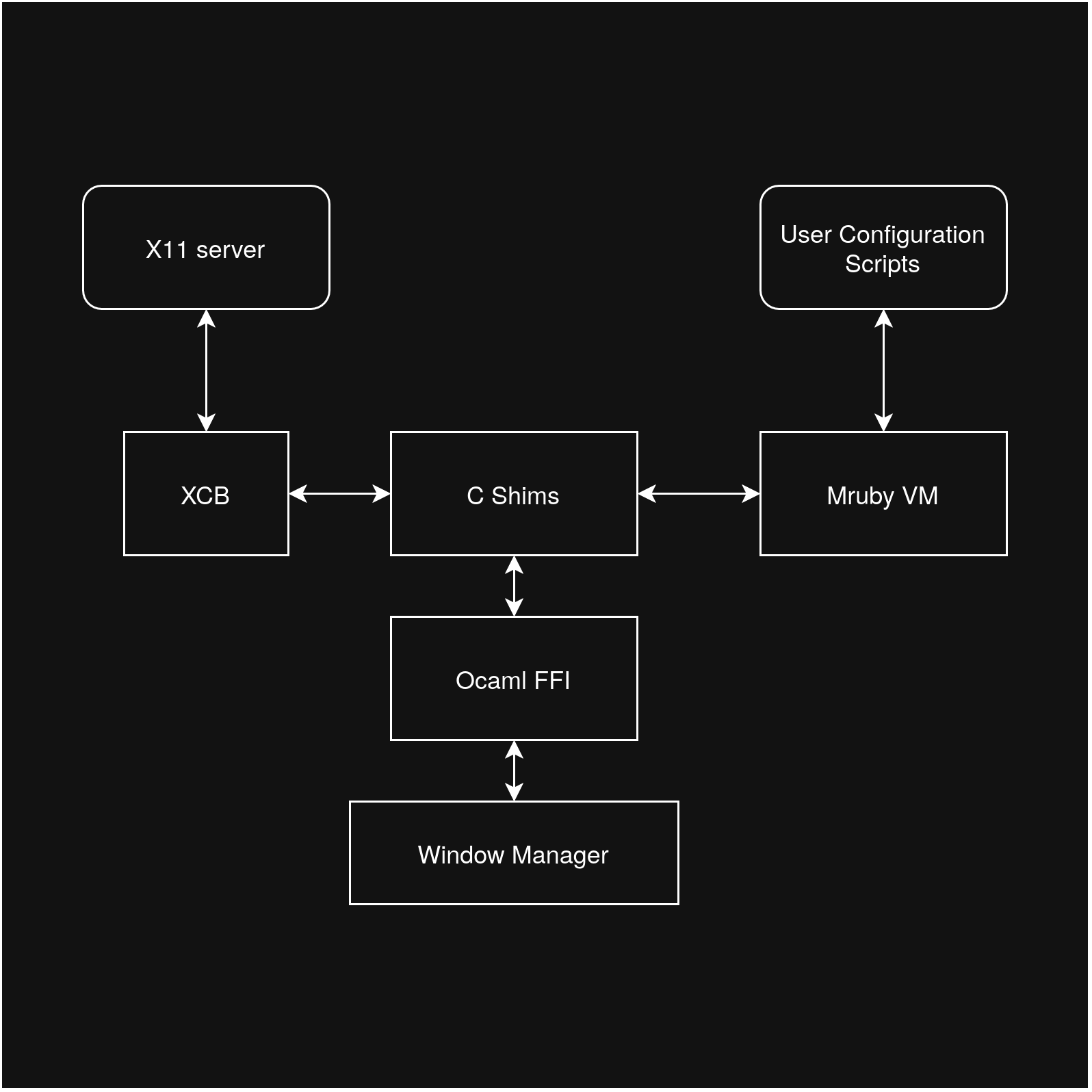
The window manager controls the windows by communicating with the X server through the XCB library, using the OCaml FFI library `ctypes-foreign`.
|
|
|
|
|---|---|---|
|
|
|
|
|
|
|
|
|Runtime performance|2, 9|Keybinds and window operations must feel immediate|
|
|
|
|
|
|
|
|
|Stability and type safety|8|A crash ends the user's whole graphical session|
|
|
|
|
|
|
|
|
|C interoperability|1, 7|Needed to call xcb and to embed the mruby VM|
|
|
|
|
|
|
|
|
|Distribution|10|One program is easier to install and run than a collection of scripts|
|
|
|
|
|
|
|
|
|Tooling and iteration speed|n/a|I am the only developer, so slow builds directly slow the project|
|
|
|
|
|
|
|
|
|
|
|
|
|
|
|
|
I included tooling deliberately. For a solo project, a toolchain that costs hours each week is a genuine technical constraint, not a matter of taste.
|
|
|
|
It also gets the events (for windows, input, displays etc.) from the X server through the XCB library.
|
|
|
|
|
|
|
|
|
|
|
|
#### Prototype 1: Ruby with FFI bindings to xcb
|
|
|
|
The window manager also hosts the Ruby VM implemented by the mruby library. It starts an instance at startup and loads any configuration once, and the script is itself allowed to reload itself or even call and run other scripts.
|
|
|
|
|
|
|
|
|
|
|
|
My first version used standard Ruby, calling xcb through FFI bindings. I started here because I already knew the language well, and it let me learn the X11 protocol (connections, event loops, MapRequest handling, key grabs) without also learning a new language.
|
|
|
|
I wrote the bindings for both libraries myself in OCaml `ctypes`, using C shims where necessary.
|
|
|
|
|
|
|
|
|
|
|
|
This worked as a learning tool. I got a basic window manager running in a couple weeks, and it confirmed that my understanding of the X event model was correct.
|
|
|
|
## Internal Architecture
|
|
|
|
|
|
|
|
|
|
|
|
I abandoned it for two reasons.
|
|
|
|
Internally, the project has 5 modules.
|
|
|
|
1. The first was performance. Ruby is not built for performance.
|
|
|
|
|
|
|
|
2. The second was structure. The prototype had grown into a collection of scripts rather than a single program, with no clear module boundaries and no compile-time checking of the layout logic. For software whose main failure mode is crashing a user's desktop, finding errors only at runtime was a poor fit. It also meant users would need a Ruby interpreter and the FFI gem installed, which weakens the distribution criterion.
|
|
|
|
|
|
|
|
|
|
|
|
|
|
|
|
Ruby was the right tool for prototyping but the wrong one for the finished product.
|
|
|
|
1. `decl`
|
|
|
|
|
|
|
|
- Declares commonly used types.
|
|
|
|
|
|
|
|
2. `bindings`
|
|
|
|
|
|
|
|
- Declares functions bound to the mruby VM (for use in the config files)
|
|
|
|
|
|
|
|
3. `kutu`
|
|
|
|
|
|
|
|
- Declares the actual core layout system, event management, state, etc.
|
|
|
|
|
|
|
|
4. `mruby`
|
|
|
|
|
|
|
|
- Mruby bindings using ctypes
|
|
|
|
|
|
|
|
5. `xcb`
|
|
|
|
|
|
|
|
- XCB bindings using ctypes.
|
|
|
|
|
|
|
|
|
|
|
|
#### Prototype 2: Haskell
|
|
|
|
## Toolchain
|
|
|
|
|
|
|
|
|
|
|
|
For the second version I wanted a compiled, statically typed language. I chose Haskell because a tiling window manager is largely a state-transformation problem: the layout tree, the workspaces and the focus are all data, and each event produces a new state. Haskell's algebraic data types, pattern matching and emphasis on pure functions suit this well. (A popular window manager `xmonad` is written in Haskell, which supports this reasoning.)
|
|
|
|
dune + nix + gcc (for mruby). (Maybe put Dune and Nix file explanation here.)
|
|
|
|
|
|
|
|
|
|
|
|
I built [Add actual fueature set i made here.] in Haskell.
|
|
|
|
## Window Representation and Data Structures
|
|
|
|
The state model was noticeably cleaner than in Ruby, and the project looked much better written.
|
|
|
|
|
|
|
|
|
|
|
|
|
|
|
|
I stopped because of the toolchain. A full GHC installation took around 9 GB of disk space, [built it and add time taken here.] for a full build, and I found the surrounding tooling (Stack and Cabal, package resolution, version compatibility) difficult to work with. Each of these slowed down the edit, build and test loop, which matters when most of the work is trial and error against a live X server.
|
|
|
|
```ocaml
|
|
|
|
|
|
|
|
type rect = { rect_x : int; rect_y : int; rect_width : int; rect_height : int }
|
|
|
|
|
|
|
|
|
|
|
|
Haskell showed me that the style of language was perfect for this problem, but the toolchain did not suit my workflow.
|
|
|
|
type direction = Horizontal | Vertical
|
|
|
|
|
|
|
|
|
|
|
|
#### Final choice: OCaml
|
|
|
|
type layout =
|
|
|
|
|
|
|
|
| Leaf of { layout_window : Xcb.Types.Window.t }
|
|
|
|
|
|
|
|
| Split of {
|
|
|
|
|
|
|
|
layout_direction : direction;
|
|
|
|
|
|
|
|
layout_ratio : float;
|
|
|
|
|
|
|
|
layout_l : layout;
|
|
|
|
|
|
|
|
layout_r : layout;
|
|
|
|
|
|
|
|
}
|
|
|
|
|
|
|
|
|
|
|
|
I moved to OCaml because it kept what I had worked with in Haskell and removed what had not.
|
|
|
|
type window_result = {
|
|
|
|
|
|
|
|
wr_rect : Decl.Types.rect;
|
|
|
|
|
|
|
|
wr_window : Xcb.Types.Window.t;
|
|
|
|
|
|
|
|
}
|
|
|
|
|
|
|
|
|
|
|
|
It kept a very similar code style, so much of my Haskell design carried over directly.
|
|
|
|
type workspace = {
|
|
|
|
|
|
|
|
mutable ws_root : layout option;
|
|
|
|
|
|
|
|
mutable ws_fwindows : Xcb.Types.Window.t list;
|
|
|
|
|
|
|
|
}
|
|
|
|
|
|
|
|
```
|
|
|
|
|
|
|
|
|
|
|
|
It also kept the pattern matching and immutable datastructures as-is and the recursive style functions for a layout tree is the best way to work with such a project.
|
|
|
|
## Layout Algorithms
|
|
|
|
|
|
|
|
|
|
|
|
But the compiler and tooling are far lighter (395MB, 463ms), and dune handles building and dependency management with far less friction than my experience of Stack. OCaml also compiles to native code, giving a single binary and solving the distribution problem that Ruby had.
|
|
|
|
```ocaml
|
|
|
|
|
|
|
|
let split_rect (rect : Decl.Types.rect) direction ratio =
|
|
|
|
|
|
|
|
match direction with
|
|
|
|
|
|
|
|
| Horizontal ->
|
|
|
|
|
|
|
|
let left_width = int_of_float (float rect.rect_width *. ratio) in
|
|
|
|
|
|
|
|
let right_width = rect.rect_width - left_width in
|
|
|
|
|
|
|
|
let left =
|
|
|
|
|
|
|
|
{
|
|
|
|
|
|
|
|
Decl.Types.rect_x = rect.rect_x;
|
|
|
|
|
|
|
|
Decl.Types.rect_y = rect.rect_y;
|
|
|
|
|
|
|
|
Decl.Types.rect_width = left_width;
|
|
|
|
|
|
|
|
Decl.Types.rect_height = rect.rect_height;
|
|
|
|
|
|
|
|
}
|
|
|
|
|
|
|
|
in
|
|
|
|
|
|
|
|
let right =
|
|
|
|
|
|
|
|
{
|
|
|
|
|
|
|
|
Decl.Types.rect_x = rect.rect_x + left_width;
|
|
|
|
|
|
|
|
Decl.Types.rect_y = rect.rect_y;
|
|
|
|
|
|
|
|
Decl.Types.rect_width = right_width;
|
|
|
|
|
|
|
|
Decl.Types.rect_height = rect.rect_height;
|
|
|
|
|
|
|
|
}
|
|
|
|
|
|
|
|
in
|
|
|
|
|
|
|
|
(left, right)
|
|
|
|
|
|
|
|
| Vertical ->
|
|
|
|
|
|
|
|
let top_height = int_of_float (float rect.rect_height *. ratio) in
|
|
|
|
|
|
|
|
let bottom_height = rect.rect_height - top_height in
|
|
|
|
|
|
|
|
let top =
|
|
|
|
|
|
|
|
{
|
|
|
|
|
|
|
|
Decl.Types.rect_x = rect.rect_x;
|
|
|
|
|
|
|
|
Decl.Types.rect_y = rect.rect_y;
|
|
|
|
|
|
|
|
Decl.Types.rect_width = rect.rect_width;
|
|
|
|
|
|
|
|
Decl.Types.rect_height = top_height;
|
|
|
|
|
|
|
|
}
|
|
|
|
|
|
|
|
in
|
|
|
|
|
|
|
|
let bottom =
|
|
|
|
|
|
|
|
{
|
|
|
|
|
|
|
|
Decl.Types.rect_x = rect.rect_x;
|
|
|
|
|
|
|
|
Decl.Types.rect_y = rect.rect_y + top_height;
|
|
|
|
|
|
|
|
Decl.Types.rect_width = rect.rect_width;
|
|
|
|
|
|
|
|
Decl.Types.rect_height = bottom_height;
|
|
|
|
|
|
|
|
}
|
|
|
|
|
|
|
|
in
|
|
|
|
|
|
|
|
(top, bottom)
|
|
|
|
|
|
|
|
|
|
|
|
However OCaml has a smaller ecosystem, and no maintained xcb bindings that suited my needs existed.
|
|
|
|
let rec calculate rect = function
|
|
|
|
So I wrote the bindings myself using ctypes, with a few small C shims where the C API was awkward to call directly.
|
|
|
|
| None -> []
|
|
|
|
This was more work than using an existing library.
|
|
|
|
| Some l -> (
|
|
|
|
|
|
|
|
match l with
|
|
|
|
|
|
|
|
| Leaf { layout_window } ->
|
|
|
|
|
|
|
|
[ { wr_rect = rect; wr_window = layout_window } ]
|
|
|
|
|
|
|
|
| Split { layout_direction; layout_ratio; layout_l; layout_r } ->
|
|
|
|
|
|
|
|
let left_rect, right_rect =
|
|
|
|
|
|
|
|
split_rect rect layout_direction layout_ratio
|
|
|
|
|
|
|
|
in
|
|
|
|
|
|
|
|
let left_windows = calculate left_rect (Some layout_l) in
|
|
|
|
|
|
|
|
let right_windows = calculate right_rect (Some layout_r) in
|
|
|
|
|
|
|
|
left_windows @ right_windows)
|
|
|
|
|
|
|
|
```
|
|
|
|
|
|
|
|
|
|
|
|
#### Comparison
|
|
|
|
## Configuration and mruby Integration
|
|
|
|
|
|
|
|
|
|
|
|
|Criterion|Ruby|Haskell|OCaml|
|
|
|
|
```ocaml
|
|
|
|
|---|---|---|---|
|
|
|
|
let register_callbacks state =
|
|
|
|
|Runtime performance|[measurement]|[measurement]|[measurement]|
|
|
|
|
register_exit state;
|
|
|
|
|Build / iteration time|None (interpreted)|[time]|[time]|
|
|
|
|
Window_op.register_kill state;
|
|
|
|
|Toolchain size|[size]|~9 GB|[size]|
|
|
|
|
Window_op.register_toggle_float state;
|
|
|
|
|C interoperability|FFI gem|[your experience]|ctypes + shims|
|
|
|
|
Ws_op.register_jump state;
|
|
|
|
|Compile-time safety|None|Strong|Strong|
|
|
|
|
Ws_op.register_ws_count state;
|
|
|
|
|Single-binary distribution|No|Yes|Yes|
|
|
|
|
Ws_op.register_ws_empty state;
|
|
|
|
|How far I got|Working prototype|[~X%]|Full implementation|
|
|
|
|
Keybinds.register_bind state;
|
|
|
|
|
|
|
|
Keybinds.register_unbind state
|
|
|
|
Looking back, the main thing I would change is the order of work. Each rewrite cost weeks, and the real deciding factors (toolchain weight and C interoperability) were things I could have tested in a single afternoon. If I started again, I would write a small test in each candidate language that opens an xcb connection, receives one event and calls into mruby, and compare the results before writing any real logic. That said, the prototypes were not wasted: the Ruby version taught me the protocol, the Haskell version taught me how to model the problem, and the OCaml version applied both lessons.
|
|
|
|
```
|
|
|
|
|
|
|
|
|
|
|
|
##
|
|
|
|
|
|
|
|
|
|
|
|
|
|
|
|
then research findings for the X11 windowing system and how all teh communication etc. happens and compositors and WM's and ssh access etc. (basically the mental model behind X11's philosofy, with diagrams maybe?)
|
|
|
|
|
|
|
|
|
|
|
|
|
|
|
|
and then about DE's and what DE's that work with X11 systems exist and how they exist to make utilizing a system easier and how people take it for granted with a little secion on trying to use a a system without any WM or DE to show how hard using such systems would be.
|
|
|
|
|
|
|
|
|
|
|
|
|
|
|
|
And then focusing on WM's and how they are supposed to work with X11's event system and how much control they have over windows
|
|
|
|
|
|
|
|
|
|
|
|
|
|
|
|
then continuing that with icccm and netwm standards and their history + why standards are getting messy over time or do not apply in all cases, for example they assume WM's will always have iconic, minimized and visible states etc. (with research findings of their histories)
|
|
|
|
|
|
|
|
|
|
|
|
|
|
|
|
then explaining how a WM is not that helpful on its own so we build some basic components to make a usable system
|
|
|
|
|
|
|
|
- the components being, a simple info bar (kinda like polybar in terms of usage)
|
|
|
|
|
|
|
|
- a menu thing similar to rofi (with simple searching) but in this case reused for a clipboard manager, command runner and emoji/unicode selection thing
|
|
|
|
|
|
|
|
- and finally a notification daemon that just shows the title and body of a notification int the corner of teh screen and a little highlight in the bar
|
|
|
|
|
|
|
|
(i can easily do the whole system and i kinda have built similar stuff b4 but im more worried about teh writeup than actual project)
|
|
|
|
|
|
|
|
|
|
|
|
|
|
|
|
---
|
|
|
|
---
|
|
|
|
|
|
|
|
|
|
|
|
This was kinda the preface section on X11 and WM's, now we do analysis of the project i chose itself.
|
|
|
|
# Development
|
|
|
|
|
|
|
|
|
|
|
|
|
|
|
|
Go through git commits and try to explain each major step and problems and solutions i came up with. and things i eventually changed from original versions.
|
|
|
|
|
|
|
|
(not sure if i should include sections on my log for the ruby and haskell versions, though i feel like it would get too long if i did.)
|
|
|
|
|
|
|
|
|
|
|
|
---
|
|
|
|
---
|
|
|
|
|
|
|
|
|
|
|
|
starting with what im deciding to build to actually go through this, with a section comparing xcb and the X11 library and then other x11 tools like xrandr etc.
|
|
|
|
# Testing
|
|
|
|
|
|
|
|
|
|
|
|
focus on the reparenting system that is standardised among these even though it is not stricly a rule needed. (and the fact that im not doing it.)
|
|
|
|
## Automated tests for data structure.
|
|
|
|
|
|
|
|
|
|
|
|
and here focus on teh exact rules laid out by icccm and netwm and how much would be needed to get working and how much would be needed for full compliance which might not even be possible in certain situations
|
|
|
|
## User testing & Performance testing
|
|
|
|
|
|
|
|
|
|
|
|
then a final concluding chart of what needs to be coded with diagrams of the system states and how they connect and teh data needed to be stored and ill be building a mostly tiling but with floating support and workspace divided system identical to i3. (basically a requirements list)
|
|
|
|
## Comparision against original feature list and what i did go through any why i dropped teh other bits.
|
|
|
|
|
|
|
|
|
|
|
|
then actual implementation of the core WM with development logs of what im actually doing with screenshots errors, fixes and rewrites id have to do because of rending issues etc. (huge section here)
|
|
|
|
---
|
|
|
|
|
|
|
|
|
|
|
|
while using O notation to show what complexity every component has and maybe even one or 2 graphs of performance/space somparisions for teh sake of it
|
|
|
|
# Conclusion
|
|
|
|
|
|
|
|
|
|
|
|
Then a sort of indev testing report of what works what changes i had to make to the initial requiremnts due to complexities arising etc.
|
|
|
|
## A more generic success conslusion and objectives
|
|
|
|
|
|
|
|
|
|
|
|
then a section on what i learnt from building this system and what i could do more and how it makes me appriciate windowing systems and parts of our computers that most people ignore while actively using
|
|
|
|
## What i learnt from it.
|
|
|
|
|
|
|
|
|
|
|
|
|
|
|
|
## Potential improvements.
|
|
|
|
|
|
|
|
|
|
|
|
|
|
|
|
|
|
|
|
|
|
|
|
---
|
|
|
|
|
|
|
|
|
|
|
|
|
|
|
|
# Bibliography
|
|
|
|
|
|
|
|
|
|
|
|
|
|
|
|
# Gannt chart
|
|
|
|
|
|
|
|
|
|
|
|
|
|
|
|
# Evaluvation of each source from bibliography.
|
|
|
|
|
|
|
|
|
|
|
|
|
|
|
|
# Screenshots etc.
|
|
|
|
 syedm
